The short answer
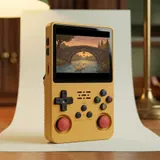
All four consoles in this comparison share the same foundation: a Rockchip RK3326 chip and 1 GB of RAM. They run the same games at the same level of emulation. What sets them apart is the screen, the Wi-Fi, the battery and the shape of the back. The R36S keeps a 3.5-inch 4:3 screen. The R36S Plus, the R36 Max and the R36 Ultra move up to a square 4-inch 720 x 720 screen. Of these three, only the Plus and the Ultra have built-in Wi-Fi.
If you want the square screen and Wi-Fi without any lighting, the R36S Plus ticks both boxes. It also has two microSD slots and a flat back. If the original 4:3 format matters more to you than connectivity, the R36S is still a sensible choice. The R36 Max focuses on a bigger battery and grips, without Wi-Fi. The R36 Ultra adds RGB-lit sticks. This guide is based only on the documented spec sheets, not on hands-on testing.
Want the classic 3.5-inch R36S instead? Our sister store r36s-console.com sells it, with the same free shipping.
The screen: square 4-inch versus 3.5-inch 4:3
On paper, the R36S Plus has 720 x 720 pixels on 4 inches and the R36S has 640 x 480 on 3.5 inches. The geometry tells you more. The display area of the Plus measures roughly 72 x 72 mm, and that of the R36S roughly 71 x 53 mm. The width is almost the same. The Plus gains in height. Overall, the display area grows by around 36%, based on a calculation from the diagonals. The calculated pixel density is around 254 pixels per inch.
The trade-off concerns games designed for 4:3, a common format in retro gaming. Shown without stretching, they keep their proportions on the square screen, with bars at the top and bottom. The game image then takes up roughly the same width as on the R36S. Display settings depend on the system and the emulator, so no specific setting is guaranteed. The R36 Max and the R36 Ultra share the same square 4-inch 720 x 720 screen.
| R36S Plus | R36S | R36 Ultra |
|---|---|---|
| Screen: 4-inch IPS, 720 x 720, square 1:1 | Screen: 3.5-inch IPS, 640 x 480, 4:3 | Screen: 4-inch, 720 x 720, square 1:1 |
| Wi-Fi: built in, 2.4 GHz, OTG port stays free, uses depending on the installed system | Wi-Fi: not built in, USB dongle in the OTG port possible depending on the installed system | Wi-Fi: built in, 2.4 GHz, uses depending on the installed system |
| Chip and memory: RK3326, 1 GB | Chip and memory: RK3326, 1 GB | Chip and memory: RK3326, 1 GB |
| Battery: 3,000 to 3,200 mAh depending on the batch, door on the back | Battery: 3,200 mAh | Battery: 3,000 mAh |
| Key features: two microSD slots, flat back | Key features: two microSD slots | Key features: RGB-lit sticks |
Wi-Fi: built in on the Plus and the Ultra, optional on the R36S
The R36S Plus and the R36 Ultra have a built-in 2.4 GHz Wi-Fi module. There is no USB dongle or adapter to plug in, and the OTG port stays free for an accessory. On the Plus, you set up the connection in the console menu, and it needs a 2.4 GHz network: there is no 5 GHz. The R36S has no built-in Wi-Fi. A USB Wi-Fi dongle plugged into its OTG port may work, depending on the installed system, but it takes up that port.
Depending on the installed system, the Wi-Fi handles the tasks listed below. It does not allow online play, linking two consoles for multiplayer, watching videos or streaming. The R36S Plus has no Bluetooth either, so there are no wireless controllers or headphones to pair. The Wi-Fi is a tool for managing the console and your library, not a tablet-style connection.
- Fetch cover art and images for the games you already own (scraper)
- Enable RetroAchievements
- Install free ports through PortMaster
- Run the updates offered by the system
- Transfer files from a computer on the same network
Same chip, same memory: the same games run the same way
The R36S, the R36S Plus, the R36 Max and the R36 Ultra are all built on the Rockchip RK3326: four Cortex-A35 cores at up to 1.5 GHz, a Mali-G31 MP2 GPU and 1 GB of RAM. The direct result is that the R36S Plus has the same power as the R36S. A game that runs well on one runs the same way on the other, with the same limits. The larger screen changes the picture, not the performance. The Plus brings the screen and the Wi-Fi, and nothing more under the bonnet.
In practice, 8-bit and 16-bit consoles, classic arcade machines, the Game Boy, Game Boy Color and Game Boy Advance, and many PS1 games run well on this chip. N64, PSP and Dreamcast depend a lot on the game and the settings. PS2 is out of reach, and no specific title is promised. Whichever model you choose, only play games you have the right to use.
Battery and back: four different approaches
On battery and handling, the spec sheets differ. The R36S Plus has a Li-Po battery of 3,000 to 3,200 mAh depending on the batch, with the exact value printed under the door. You can replace it through that ridged door on the back. The R36S is listed at 3,200 mAh. The R36 Max goes up to 4,000 mAh and adds rear grips, without built-in Wi-Fi. The R36 Ultra lists 3,000 mAh and stands out with its RGB-lit sticks. No runtime in hours is given for any of these models.
The back of the R36S Plus is flat, with a raised section that holds the four shoulder buttons: L1 and R1 on the outside, L2 and R2 on the inside. Of these models, only the R36 Max has grips. For charging, the Plus uses the USB-C port marked DC on the bottom edge, with a 5 V adapter of at least 1.5 A. A USB-C cable is included, but no mains charger is.
The R36XX and the older 3.5-inch R36S Plus: different devices
Similar names cause confusion. The R36XX pairs a 3.5-inch 640 x 480 screen, like the R36S, with built-in Wi-Fi and the same RK3326 chip. On paper, it is closer to an R36S with Wi-Fi than to an R36S Plus. There is also an older console sold as the "R36S Plus", with a 3.5-inch screen and a single analogue stick. It has nothing to do with the 4-inch model released in April 2025, which has two clickable sticks.
Even the 4-inch model goes by several names: the box says "R36Plus", while the label and the boot screen say "R36S Plus". It is the same device. To avoid a mix-up, always check a listing for two details: a square 4-inch 720 x 720 screen and built-in Wi-Fi. If either is missing, it is probably a different console. A photo alone is not enough: the spec sheet settles it.
Which model suits whom?
Choose the R36S if the original 4:3 format matters to you, with a full picture on a 3.5-inch screen, and Wi-Fi isn't a priority: a dongle in the OTG port is still possible, depending on the installed system. Choose the R36S Plus if you want the taller, square 4-inch screen and built-in Wi-Fi without using the OTG port, plus two microSD slots and a flat back. Choose the R36 Max if the biggest battery of the group and grips matter more than Wi-Fi. Choose the R36 Ultra if you like RGB-lit sticks.
Finally, the R36XX is for anyone who wants Wi-Fi on a 3.5-inch 4:3 screen. In every case, emulation stays the same, so the choice comes down to the screen, connectivity and how the console feels in your hands. The R36S Plus sold in our shop is the version with the square 4-inch screen and built-in Wi-Fi. It comes with an open-source Linux system preinstalled, and delivery terms are confirmed before you order.
Frequently asked questions
Will my broadband router work with the R36S Plus Wi-Fi?
The console only connects on 2.4 GHz. Many routers broadcast both bands, so check in the router settings that 2.4 GHz is switched on. You then set up the connection in the console menu, and what you can do with it depends on the installed system.
Can I install different firmware on the R36S Plus?
Community images exist for this model, such as dArkOSRE-R36, (d)ArkOS4Clone or plumOS-R36Plus. The older ArkOS for the R36S Plus has been archived. None of them come with the console or are supported. Flashing is at your own risk, and you should back up both microSD cards first.
What size microSD card should I choose?
The R36S Plus takes cards up to 128 GB. Capacity changes how much room you have for your games, not performance, and usable space after formatting is lower than the stated capacity. The TF1-OS card, on the right side, holds the system. The TF2-GAME card, on the left side, holds the games.
Sources
- Handhelds Wiki, R36Plus
- Retro Handhelds, R36Plus review (May 2025)
- Notebookcheck, R36S Plus: 1:1 retro gaming handheld
- Tech Tactician, R36S, R36XX, R36 Plus, Max and Ultra explained
- Handhelds Wiki, R36XX
Our guides are based on the supplier's product sheets and public documentation. We do not claim any hands-on testing.