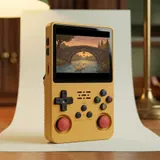
The name trap: two spellings, several devices
R36S Plus and R36Plus refer to the same device: the vertical console with a square 4-inch screen and built-in Wi-Fi, released in April 2025. The box says "R36Plus," while the label and the boot screen say "R36S Plus." Neither spelling is more authentic than the other. No single brand stands behind this family of consoles, so "original" here simply means the right version. The catch is that the same name gets used for other machines. An older "R36S Plus" with a 3.5-inch screen and a single stick did exist, and other consoles are sold under similar names.
Another source of confusion: some listings reuse the spec sheet of a different model. You might see a listing that claims a 3.5-inch 640 x 480 screen right next to a photo of a square screen. That is usually a copy-and-paste between similar models, not bad faith. Related models muddy the waters too. The R36 Max has the same square screen, but no Wi-Fi. The R36 Ultra has the screen and the Wi-Fi, but lit sticks and a different board. The R36XX has Wi-Fi, but a 3.5-inch screen.
What to check in the listing
Before you buy, read the description and look at the photos together. Don't go by the title alone. Five features identify the right version, and the text and the images should agree on them. If one is missing or contradicts another, ask the seller in writing before you order. Their answer will come in handy if the device you receive doesn't match. Watch out for a screen listed as 3.5 inches or 640 x 480, and for a listing that says nothing about Wi-Fi or offers a USB dongle to add it.
In photos, the shape is easy to spot: the square screen takes up almost the full width of the front. The announced dimensions are 82 x 142 x 28 mm. The console has no internal memory: everything runs from microSD cards, up to 128 GB per card. A listing that mentions built-in storage is describing another device, or is simply wrong. The same goes for any mention of Bluetooth or 5 GHz Wi-Fi: this model has neither.
- A square 4-inch IPS screen, 720 x 720 pixels, 1:1 aspect ratio.
- Built-in 2.4 GHz Wi-Fi, with no dongle or adapter to plug in; features depend on the installed system.
- Two clickable analog sticks (L3 and R3).
- Two microSD slots: TF1-OS for the system, TF2-GAME for your games.
- A mainboard marked V20 (R36S Plus-V20).
| What to check | Where | What you should see |
|---|---|---|
| Screen | Listing, photos, then the console turned on | Square 4-inch screen, 720 x 720; a 4:3 game with bars at the top and bottom |
| Wi-Fi | Listing, then the system settings | Built-in 2.4 GHz Wi-Fi; a Wi-Fi menu depending on the installed system, with no dongle in the OTG port |
| Controls | Front of the console | Two clickable analog sticks |
| microSD slots | Sides of the console | TF1-OS on the right, TF2-GAME on the left |
| Device name | Boot screen, back label, box | "R36S Plus" at startup and on the label, "R36Plus" on the box |
| Battery | Under the door on the back | Printed capacity, 3,000 to 3,200 mAh depending on the batch |
| Mainboard (optional) | Seller's photo, or through the translucent shells | R36S Plus-V20 marking and built-in Wi-Fi module |
What to check when it arrives
When it arrives, keep the box and packaging until you've finished checking. Start with the screen: once it's on, it should be perfectly square. A 4:3 game shown without stretching keeps its proportions, with bars at the top and bottom. That's normal on this screen. Next, open the settings. Depending on the installed system, a Wi-Fi menu appears there, with nothing plugged into the OTG port. To connect, you need a 2.4 GHz network. Finally, check the name: the boot screen shows "R36S Plus." Depending on the system, the info page in the menu also names the device.
Then turn the console over. The label on the back reads "R36S Plus." Under the ribbed battery door, the capacity is printed: 3,000 to 3,200 mAh depending on the batch. Check the sides as well: TF1-OS on the right, TF2-GAME on the left, Power and Reset on the left, volume on the right. On the bottom edge you'll find three ports: the USB-C port marked "DC" for charging, the headphone jack in the middle and the USB-C port marked "OTG" for accessories.
Board photos, for those who open their devices
The most reliable marker is still the mainboard itself. It is marked "R36S Plus-V20" and carries the built-in Wi-Fi module. That's the photo to ask the seller for if you still have doubts before buying. Opening the shell yourself isn't recommended. You have to take the device apart and handle fragile connectors, and disassembly can complicate an exchange. The earlier checks are almost always enough. A square screen, a Wi-Fi menu with no dongle and the right name at startup already point to the right version.
There's a gentler way to get a look at the board. The purple and "lake blue" shells are translucent, so you can see the board through them. A photo taken through the shell doesn't replace a photo of the bare board, but it can help clear up a doubt. If you ask the seller for a photo, be specific about what you want to see: the R36S Plus-V20 marking and the Wi-Fi module on the board.
If it's not the right version
Is your screen rectangular, the Wi-Fi menu missing or the name wrong? Don't open anything and don't modify the cards. Take photos of the screen turned on, the label and the settings without Wi-Fi. Keep a screenshot of the listing too. Then write to the seller, calmly, describing the gap between the listing and the device you received. If you bought on a marketplace, use its messaging system. Often it's a batch error or copied text, and an exchange sorts it out.
If the exchange goes nowhere, your consumer rights may help. They depend on where you live and on the seller, so check the written return terms before ordering. On our side, orders only open once the supplier has confirmed the 4-inch version with built-in Wi-Fi in writing, and shipping, taxes and returns are confirmed before the payment page. The R36S Plus sold here is that version, with a square 4-inch screen and built-in Wi-Fi.
Frequently asked questions
Can I use the Wi-Fi to play online?
No. Depending on the installed system, the 2.4 GHz Wi-Fi fetches cover art and images for the games you already own. It also lets you enable RetroAchievements, install free ports through PortMaster and run the updates offered by the system. Finally, it lets you transfer files from a computer on the same network. It doesn't support online play, network multiplayer or streaming. There is no Bluetooth.
Is the R36S Plus more powerful than the R36S?
No. It uses the same Rockchip RK3326 chip and 1 GB of RAM, so emulation performance is the same. What changes is the square 4-inch 720 x 720 screen, with about 36% more screen area, and the built-in Wi-Fi. A listing that promises more power than the R36S is describing the device incorrectly.
Does the shell color help identify the version?
Not really. The R36S Plus comes in white, black, purple, "lake blue" and yellow, the yellow one with red sticks. The shade can vary from batch to batch, and other models come in similar colors. A soccer ball pattern points more toward the R36 Max, and lit sticks toward the R36 Ultra. Check the screen, the Wi-Fi and the name first.
Do I need to install a different system to check the version?
No. The preinstalled open-source Linux system is all you need to check the screen, the Wi-Fi menu and the name at startup. Community systems exist for this model, but installing them is at your own risk, after backing up your cards. Do your checks before installing anything: a device left in its original state is easier to show the seller if something doesn't match.
Sources
- Handhelds Wiki, R36Plus
- Retro Handhelds, R36Plus review (May 2025)
- Gouforit, R36Plus consola retro (August 2025)
- Handhelds Wiki, R36S Plus (Allwinner F1C200S, a different device)
- Notebookcheck, R36S Plus: 1:1 retro gaming handheld
Our guides are based on supplier spec sheets and public documentation. We don't claim any hands-on testing.