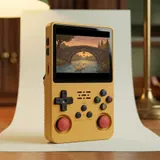
How emulation works on this handheld
The R36S Plus doesn't play cartridges or discs. It runs emulators, which are programs that imitate the hardware of older consoles. Everything runs on an open-source Linux system preinstalled at the factory. That factory system isn't exactly the same from one batch to the next. The menu is EmulationStation style: a list of systems, then a list of the games on your card for each one. Behind the scenes, emulators often rely on cores, which are specialized emulation modules. A single system can offer several cores. Some are more accurate, others are lighter.
The console has two microSD slots. TF1-OS, on the right side, holds the system. TF2-GAME, on the left side, holds your games on a card of up to 128 GB. During play, the FN button opens the emulator menu, with picture and control settings. The exact options depend on the installed system and the core in use.
Systems that run well
The RK3326 has four Cortex-A35 cores running at up to 1.5 GHz, a Mali-G31 MP2 GPU and 1 GB of RAM. That's modest, but it's plenty for the 8-bit and 16-bit generations. Home consoles from those eras, classic arcade machines, Game Boy, Game Boy Color and Game Boy Advance all run well. So do many PS1 games, with the right core. On these systems, the work is mostly picking a core and adjusting the picture, not chasing performance.
The R36S Plus has exactly the same chip as the R36S. That means the same level of emulation. What it adds is the square 4-inch screen and built-in Wi-Fi, not extra power. A practical tip: if a game won't start or acts up, try another core before blaming the hardware.
| System family | What to expect | Note |
|---|---|---|
| 8-bit and 16-bit consoles | Runs well | 4:3 picture with bars at the top and bottom |
| Classic arcade | Runs well | Core choice matters depending on the game |
| Game Boy, Game Boy Color | Runs well | Nearly square picture, fills the screen well |
| Game Boy Advance | Runs well | Wider picture, bars at the top and bottom |
| PS1 | Many games run well | Settings depend on the core |
| N64, PSP, Dreamcast | Depends on the game and settings | No game guaranteed |
| PS2 and later | Out of reach | Hardware limit of the RK3326 |
What depends on the game, and what's out of reach
N64, PSP and Dreamcast sit at the edge of what the RK3326 can do. Results vary a lot from game to game and depend on your settings. Some games stay enjoyable, others slow down or show picture or sound glitches. The usual fixes: switch cores, lower the internal resolution, turn off effects. Available settings vary by system and emulator, so there's no one-size-fits-all recipe. Think of these systems as a bonus, not a reason to buy.
PS2 and newer consoles are beyond this chip. No setting will change that, because the limit is the hardware. Community firmware images exist for this model, but you install them at your own risk, after backing up your cards, and they don't make the console more powerful. For those generations, stick with the original console.
The square screen and aspect ratios
The 4-inch IPS screen shows 720 x 720 pixels in a square 1:1 format, about 254 ppi. The display area is about 72 x 72 mm, compared with about 71 x 53 mm on the R36S: same width, more height. Most home consoles output a 4:3 picture. Shown without stretching, it keeps its proportions and leaves bars at the top and bottom. For those games, the usable width is the same as on the R36S.
Handhelds like the Game Boy and Game Boy Color have a nearly square picture. They make better use of the screen, with only small bars. The Game Boy Advance picture is wider, so it leaves bars at the top and bottom. Stretching the picture to fill the square is sometimes possible, at the cost of distorted proportions. Display options depend on the system and the emulator.
Menus and languages
The menu language depends on the installed system. Since the factory system varies by batch, the available languages vary too. When your preferred language is offered, you select it in the main menu settings. Some items may stay in English regardless, such as technical option names or the emulator menu, depending on the setup. Navigation always follows the console's layout: D-pad, ABXY buttons in a diamond, Select and Start, two clickable analog sticks and four shoulder buttons on the back.
Games keep their own language. The console menu has no effect on the text shown during play. A game released in Japanese stays in Japanese. A game's language depends on the version you own, not on the console. Keep that in mind before making backup copies of your own games.
Free ports through PortMaster
PortMaster is a community tool that installs ports, meaning games and engines adapted for Linux handhelds like this one. Depending on the installed system, it works directly over the built-in Wi-Fi. That Wi-Fi is 2.4 GHz only: you need a 2.4 GHz network, set up in the console menu. No USB dongle is needed, and the OTG port stays free for an accessory. The available catalog varies by system and version.
Depending on the installed system, the Wi-Fi can also fetch cover art and images for the games already on your card, enable RetroAchievements, run the updates offered by the system and transfer files from a computer on the same network. It doesn't support online play, network multiplayer, streaming or video apps. The console has no Bluetooth.
Playing legally
The console itself is just hardware. What matters is the game files. Only play games you have the right to use: backup copies of games you own, where local law allows it, homebrew games made by independent developers, and games their creators distribute for free. Rules on personal copies vary from country to country. This guide doesn't link to any ROMs and doesn't promise any games.
This is general information, not legal advice. If you're unsure, check the laws where you live. The R36S Plus sold here is the version with a square 4-inch screen and built-in Wi-Fi. It shares the R36S chip and its limits, with a taller screen and a wireless connection for the uses described above.
Frequently asked questions
Does a 128 GB card make games run faster?
No. Card capacity changes how much fits, not performance. Usable space after formatting is also lower than the rated capacity. Emulation speed depends on the RK3326 chip and the core you choose. The TF2-GAME slot, on the left side, takes a card of up to 128 GB.
Can I connect the console to a TV?
No. The R36S Plus has no HDMI or TV output. The bottom edge has a USB-C port marked DC for charging, a 3.5 mm headphone jack in the center and a USB-C port marked OTG for accessories. You play on the square 4-inch screen, with sound from the front speaker or headphones.
How do I charge it, and what about the battery?
Charging goes through the USB-C port marked DC, using a 5 V adapter of at least 1.5 A. A USB-C cable is included, but no wall charger is. The Li-Po battery is 3,000 to 3,200 mAh depending on the batch (printed under the door). It's replaceable through that door on the back.
Sources
- Handhelds Wiki, R36Plus
- Retro Handhelds, R36Plus review (May 2025)
- Die oxidierten Schweine, R36S Plus Retro-Handheld (June 2025)
- PortMaster
Our guides are based on supplier spec sheets and public documentation. We don't claim any hands-on testing.